Fast POS Checkout
Serve customers faster with an intuitive, lightning-fast checkout.

WanPOS is a point-of-sale built for coffee shops — fast checkout, a menu that sells itself, and reports that actually make sense. No terminal, no training manual, just tap and go.
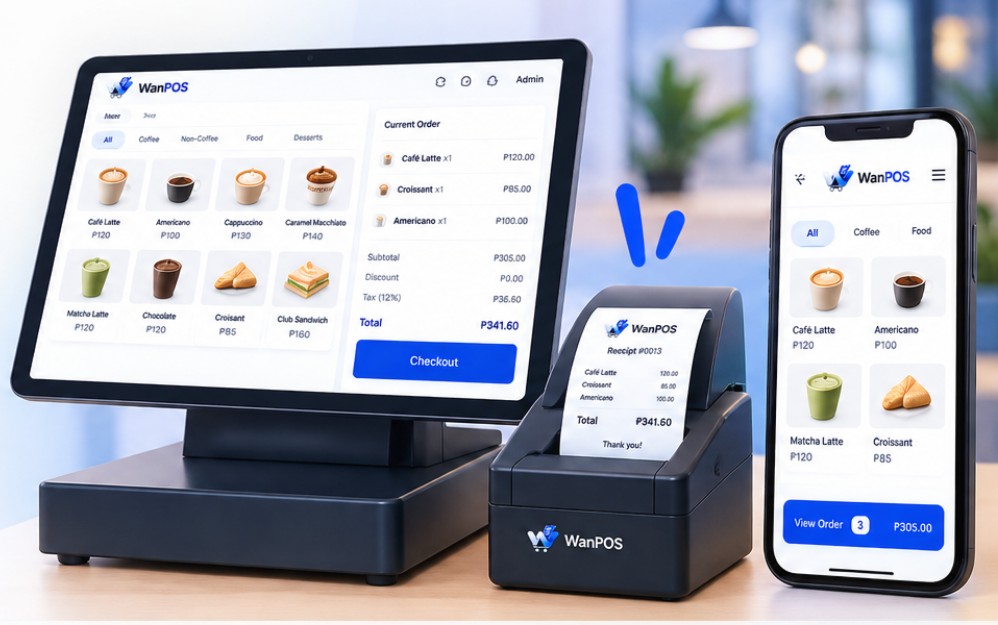
Serve customers faster with an intuitive, lightning-fast checkout.
Manage products, stock, variants, pricing and categories with ease.
Track sales, top items, and performance without the guesswork.
Accept cash, GCash, Maya, cards, and bank transfers seamlessly.
Built around the everyday problems business owners deal with — so your team can focus on serving customers, not managing the system.
Keep the line moving with a simple ordering flow designed for busy café counters.
Less waiting. More orders.Keep products and inventory visible so you can spot what is moving and what needs attention.
Stay ahead of stockouts.Turn every transaction into clear sales information you can understand at a glance.
Know what sells.Use WanPOS on the devices that fit your business — from the counter tablet to your phone or desktop.
Your café, your setup.Local payments, Philippine pesos, café-friendly workflows, and the tools you need behind the counter — all in one system.
Keep your menu, orders and reports in Philippine pesos.
Support cash, GCash, Maya, cards and bank transfers in your checkout flow.
Connect your supported receipt printer and keep the counter moving.
Track products and stock so you can act before popular items run out.
Use the device that fits your operation — tablet, phone or desktop.
Designed around fast ordering, menu variants, shifts and daily business operations.
From your neighborhood sari-sari store to a growing multi-branch business, WanPOS adapts to the way you sell.
Menus, variants, add-ons and fast checkout for busy counters.
Manage products, orders, payments and daily sales from one system.
Keep product pricing, stock and fast item lookup organized.
Track products, inventory and sales with a clearer view of your store.
Simple selling and inventory visibility without unnecessary complexity.
Manage products, stock, sales and reports as your business grows.
No bolted-on add-ons. Every part of WanPOS was built around one thing: keeping the line moving.
Cash, GCash, Maya, card, or bank transfer — even split across methods — in a few taps.
Product photos auto-fit to your menu tiles, with configurable Hot / Iced badges so nothing gets mixed up.
Sales, top products, and payment breakdowns update live — no waiting on end-of-day exports.
Track stock per product and variant, and know what's running low before you run out.
Open, close, and reconcile shifts with a clean audit trail — no more guessing what's in the drawer.
Tablet at the counter, phone on the floor, laptop in the back office — one account, every screen.
Apply a percentage or fixed discount and service charge in seconds, itemized clearly at checkout.
Multi-tenant from day one — add a second location without starting from scratch.
A closer look at the screens your team will actually use, every single shift.
One clean checkout for cash, GCash, Maya, cards, and bank transfers — with the amount due, payment method, cash received, and confirmation all visible at a glance.

Sales overview, top products, and payment-method breakdowns — updated live as orders come in, not after you close the register.

We help you get WanPOS configured around the way your business actually operates.
Tell us about your business, current setup, and what you want WanPOS to improve.
Menu, products, pricing, payment methods, inventory and other settings are prepared for your business.
We walk your staff through ordering, checkout, shifts and the daily workflow.
Once everything is ready, your team can start taking orders and tracking sales with WanPOS.
Start with the hardware that fits your counter. Already have a tablet, phone, desktop or printer? Talk to us about your setup.
A clean counter setup for fast ordering and checkout.
Keep printed receipts moving without slowing down the line.
Check sales, manage the business and work from the screen you already use.
WanPOS is ₱67/day equivalent · ₱1,999 billed monthly — about ₱67/day. Compare that with the value of faster checkout, better visibility and fewer manual tasks.
A complete POS built for Philippine businesses — without complicated setup or expensive hardware.
Here are the things business owners usually want to know first.
No. The right setup depends on your business. We can discuss your existing devices and supported hardware during your appointment.
WanPOS is designed to work across common phone, tablet and desktop workflows. We'll review your current setup with you.
The checkout is designed around cash, GCash, Maya, cards and bank transfers, depending on your configured payment setup.
The public subscription is ₱67/day equivalent · ₱1,999 billed monthly. One-time setup and onboarding are discussed during your appointment based on your business requirements.
Yes. The onboarding process covers configuration and helping your team understand the daily workflow.
Yes. WanPOS includes inventory visibility and real-time sales reporting so you can monitor what is selling and what needs attention.
See WanPOS in action, talk through your business setup, and find out how we can get you running. No pressure — we'll answer your questions and recommend the right setup.